
Muse Video AI Video Generator

Enter a description, or upload images and describe the action. Generate a video with sound, about 10 seconds long, for 20 credits per video.

The light text is an example. Enter your own description to enable generation.

Aspect

Muse Video / 04

Muse Video examples

These 4 videos were generated with Muse Video from text or reference images. Play them to see the results, or use an example to start your own video.

01 / 16:91280 × 720

Glass whale animation

A glass whale swims between coral and gears as the camera moves slowly forward.

View generation prompt

A cinematic macro film inside a tiny glass terrarium. A delicate translucent glass whale slowly swims above a living coral reef made of tiny clockwork flowers, its fins refracting soft turquoise light. Small brass petals open one by one as the whale passes. The camera makes one gentle slow dolly forward, coherent continuous motion, tactile miniature craftsmanship, dreamy sunlight and suspended sparkling bubbles. Sound: delicate underwater bubbles and soft glass chimes. One continuous elegant shot, no cuts, no text, no logos.
Use this example
02 / 16:91280 × 720

A cloud turns into a bird

A tailor cuts a cloud with scissors. It turns into a small bird and flies from the table toward the window.

View generation prompt

In a sunlit attic atelier, a kindly elderly tailor in a cream linen vest carefully cuts a small fluffy cloud with polished silver scissors on an oak worktable. The cut piece unfolds into a tiny graceful cloud bird, flaps its wings and floats toward the open window as the tailor smiles. A poetic surprising visual transformation with clear physical movement, warm cinematic light, believable cloth and wood textures, camera slowly arcs around the table. Sound: gentle scissors, soft fabric rustle and a light airy flutter. No text or logos.

Use this example
03 / 16:91280 × 720

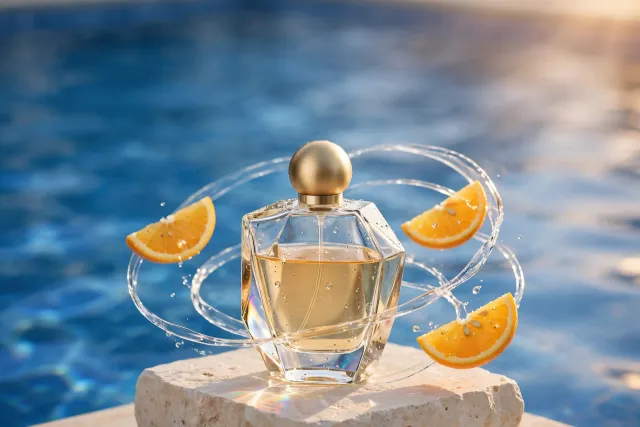
Perfume product video

A perfume product image becomes a video with orange slices and water moving around the bottle.

Input image · Perfume product video
Input image Generated result
View generation prompt

Create a luxurious continuous perfume commercial using the reference image. Keep the same unbranded clear glass bottle, pale amber liquid and brushed gold spherical cap centered on its ivory plinth. Thin orange slices slowly orbit the bottle as a translucent ribbon of water spirals gracefully around it, with realistic droplets sparkling in warm apricot sunlight and cobalt pool reflections. Camera performs a smooth subtle quarter-circle orbit, refined physical motion, bottle remains stable and recognizable. Sound: a soft water swirl and a delicate crystalline shimmer. No cuts, no text, no logo.

Use this example
04 / 16:91152 × 648

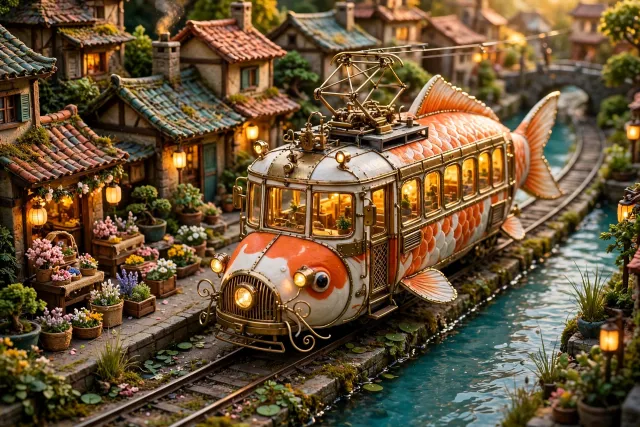
Koi-shaped tram in motion

A video made from the koi-tram image, with the tram moving along tracks beside a canal.

Input image · Koi-shaped tram in motion
Input image Generated result
View generation prompt

Animate the miniature koi-fish tram scene in the reference image. Keep the orange-and-white koi tram design, tiny canal-side houses and flower stalls. The tram glides slowly toward the camera on its rails while its delicate fins sway; warm passenger windows glow, flowers flutter in a mild breeze, sunlight dances on the turquoise canal. Camera smoothly tracks backward at tram speed in a single charming continuous shot, fine handcrafted textures and stable geometry. Sound: a gentle tram bell, quiet rolling wheels and water ripples. No text, no logos.

Use this example

Generate videos from text or images

Make product videos, animate photos or create short scenes. Describe the people, objects and actions, and add reference images if needed. Video and sound are generated together.

Available settings

Resolution
720P
Aspect ratios
16:9 · 9:16 · 1:1 · 4:3 · 3:4 · 3:2 · 2:3
Duration
The model decides the output length; a fixed duration is not guaranteed.
Reference images
9

Text or references to video

  • 720P — 20 credits

Confirm the current credit quote for your selected settings in the workspace.

View plans and credit packs

What Muse Video can do

Generate videos from text or reference images, with sound included.

Text to video

Describe the scene, action and camera movement, such as a swimming whale or a rotating product.

Image to video

Upload up to 9 reference images and describe how the scene should move or change.

Video with sound

Generate one clip about 10 seconds long with AI-generated sound. Preview the result and download the MP4 file.

How to use Muse Video

Add a description, choose an aspect ratio and check the credit cost before generating.

1

Describe the video

Explain the scene and action. Upload images when you want to reference a person, product or setting.

2

Choose an aspect ratio

Choose landscape, portrait or another supported ratio. Videos are about 10 seconds long; other durations are not available.

3

Generate and download

Confirm the 20-credit cost, then generate. Play the completed video to check it before downloading.

Example video description

Example prompt

A transparent glass whale swims slowly between coral and gears, with sunlight passing through its body. The camera moves slowly forward. Add quiet water sounds and soft chimes. Use one continuous shot without cuts.

Say what is moving and how the camera should move. Add water, wind or other background sounds when needed.

Before you start

Muse Video FAQ

Answers about video length, reference images, sound and credits.